B2B Content Cluster Guide: Build Authority and Rank Higher
Many B2B websites publish useful articles without deciding how those pages should work together.
One article may answer a buyer question while another covers a related product or service. Without a clear structure, these pages can remain disconnected.
A content cluster connects these pages around one main topic.
1. Why Content Clusters Matter for B2B Websites
B2B buyers often need information from several pages before they understand a subject or evaluate a solution.
A content cluster lets your website cover the main topic from different angles instead of relying on one broad article.
This broader coverage can contribute to topical depth. Relevant internal links can also help search engines understand how related pages connect and make those pages easier to discover.
For readers, the structure provides a clearer way to move from a general topic to a specific question and then to a relevant business offering.
2. What Makes Up a Content Cluster?
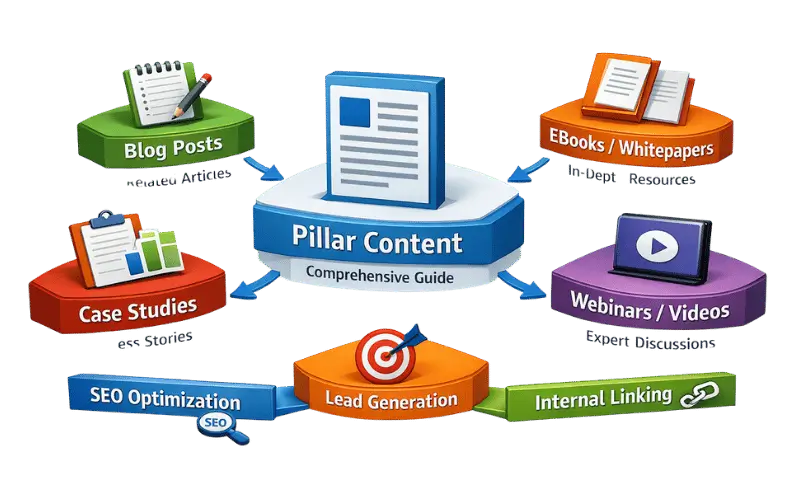
A content cluster usually has three main elements: a pillar page, supporting pages, and internal links.
The Pillar Page
The pillar page covers the main subject at a broad level.
It should introduce the important areas of the topic without trying to explain every detail. More specific information can be covered on separate supporting pages.
For example, a SaaS company that provides CRM software could create:
Pillar page:
Complete Guide to CRM Software
The pillar could introduce CRM features, integrations, implementation, security, and reporting.
Each area can then lead to a more focused article.
Supporting Pages
Supporting pages answer specific questions related to the main subject.
For the CRM example, these could include:
- CRM implementation guide
- CRM data migration
- CRM integration
- CRM reporting
- CRM security
Each page should add information that is more specific than the pillar page.
Internal Links
Internal links connect the pages within the cluster.
A supporting article can link to the pillar when the reader needs broader information. The pillar can link to supporting pages when readers want more detail about a specific subject.
These links should be added because the relationship is useful, not simply to increase the number of internal links.
3. Choose a Topic That Can Support a Cluster
A content cluster needs enough depth to justify several related pages.
Start with a subject that is closely connected to your products, services, or target market.
Start With a Business-Relevant Topic
The main topic should have a clear connection to what the business offers.
For example, a manufacturing company that provides industrial automation solutions could build a cluster around Industrial Automation.
The pillar could cover the overall subject, while supporting pages explain PLC systems, production monitoring, automation costs, and implementation.
This gives the content a clear business connection rather than creating pages only because keywords are available.
Look at Buyer Questions
Think about what potential customers need to know before choosing a solution.
A fintech company offering payment software, for example, may find that buyers want information about payment gateways and processing costs.
Those questions can provide ideas for supporting pages.
Check Whether the Topics Are Different Enough
Not every related keyword needs its own article.
If two searches have almost the same intent, combining them into one stronger page may be better than creating two pages that compete with each other.
Create a separate page when it can answer a distinct question or search need.
4. Build the Content Cluster Step by Step
Step 1: Choose the Main Business Offering
Start with the product or service you want the cluster to support.
For example, a SaaS company offer CRM implementation services.
The cluster should cover questions that potential customers may have before or during the implementation process.
Step 2: Select the Pillar Topic
Choose a broad topic that can introduce the main subject without becoming too general.
For example:
Complete Guide to CRM Implementation
This page could briefly cover planning, data migration, integrations, user adoption, timelines, and common challenges.
Each area can then have its own supporting page when enough depth exists.
Step 3: Find Supporting Topics
List the important questions that deserve more detailed explanations.
For the CRM implementation example:
- CRM data migration guide
- CRM integration process
- CRM implementation timeline
- CRM user adoption
- CRM implementation costs
The supporting pages should expand on these subjects rather than repeat the pillar page.
Step 4: Give Each Page a Clear Purpose
Before creating a page, decide what question it will answer.
The pillar should provide the broad overview.
A supporting page should focus on one specific subject.
A service page should explain the actual commercial offering.
This separation helps prevent multiple pages from targeting the same purpose.
Step 5: Create the Internal Linking Structure
Connect the pages where the relationship makes sense.
For example, the CRM data migration page can link to the main CRM implementation guide when readers need broader context.
The pillar can link back to the migration guide from its data migration section.
The migration page could also link to the CRM integration article if those subjects naturally connect.
5. Connect the Cluster to the Relevant Service Page
The content cluster should support the commercial side of the website without turning every article into a sales page.
A service link makes sense when the reader has reached a point where professional help could be relevant.
For example:
Pillar:
Industrial Automation Guide
Cluster page:
Production Monitoring Systems
Service page:
Industrial Automation Solutions
A reader researching production monitoring may want to understand how these systems fit into a larger automation project.
Once that context is established, a link to the relevant service page can provide a logical next step.
The same principle can work across different B2B industries.
SaaS example
Pillar: CRM Implementation Guide
Cluster page: CRM Data Migration
Service page: CRM Implementation Services
The service link fits because a reader researching migration may also be evaluating implementation support.
6. Create Useful Connections Between Supporting Pages
Supporting pages do not need to remain isolated.
When two topics naturally overlap, linking between them can help readers continue their research.
For example, a fintech website could have:
Pillar: Payment Software Guide
Supporting page: Payment API Integration
Supporting page: Payment Security
A payment API article may mention security considerations during integration. A relevant link to the payment security article can help readers explore that issue in more detail.
The important point is relevance.
Do not connect every supporting page simply because they belong to the same cluster.
7. Match Content to Different Buyer Needs
B2B buyers may search for different types of information depending on where they are in their research.
A cluster can cover these needs without forcing every page to target a commercial keyword.
For example, a manufacturing cluster around Industrial Automation could include:
Informational:
What Is Industrial Automation?
Research-focused:
Types of Industrial Automation Systems
Evaluation-focused:
Industrial Automation Costs
Implementation-focused:
How to Implement Industrial Automation
Commercial:
Industrial Automation Solutions
Each page has a different purpose while remaining connected to the same broader subject.
8. Avoid Common Content Cluster Problems

Creating Pages Only for Keywords
A keyword list should not automatically become a content plan.
Each page should answer a useful question or provide information that deserves its own page.
Making Every Supporting Page Too Similar
If several articles explain almost the same thing, the cluster becomes repetitive.
Give each page a clear subject and decide what information belongs on that page.
Overloading the Pillar Page
The pillar should provide a useful overview, not reproduce every supporting article.
Keep detailed explanations on the pages designed for those specific topics.
Adding Too Many Internal Links
More links do not automatically create a better cluster.
Use links where they help readers move to relevant information.
Forgetting the Commercial Path
A cluster can attract useful search traffic without contributing much to the business if it has no connection to relevant products or services.
Where appropriate, give readers a clear path toward the related commercial page.
9. Review and Improve the Cluster
A content cluster should not be treated as a one-time publishing project.
After the pages have been live for some time, review how they perform and whether the structure still makes sense.
Check:
- Which pages receive organic traffic
- Which queries bring impressions
- Which pages attract backlinks
- Which internal links receive clicks
- Which pages lead visitors toward commercial content
- Whether multiple pages overlap in topic or intent
If two pages cover almost the same subject, consider whether they should be combined.
If an important supporting topic is missing, consider adding it when there is enough value to justify a new page.
FAQs
How many pages should a B2B content cluster have?
There is no fixed number.
The size should depend on the depth of the subject and the number of useful questions around it.
A narrow subject can work with a few supporting pages. A broader B2B topic can support a larger cluster.
Does every content cluster need a pillar page?
A pillar page is useful when several supporting pages need a central topic.
For a small group of closely related pages, a single comprehensive article can be enough.
Should every supporting page link to the service page?
No.
Add a service link when the offering provides a useful next step for the reader. Repeating the same commercial link across every article can make the content feel forced.
Can a page belong to more than one cluster?
Yes, when the page genuinely supports both topics.
For example, a fintech article about Payment API Integration could relate to both a payment software cluster and an API integration cluster if the page serves both subjects naturally.
Can content clusters improve SEO?
They can support a clearer site structure and broader topical coverage when the pages are genuinely useful and well connected.
Relevant internal links can help search engines discover pages and understand relationships between them.
However, a content cluster does not guarantee higher rankings. Search performance can also depend on content quality, search intent, competition, technical SEO, backlinks, and other factors.